How to build a speed-to-lead SOP when you’re on the job site
Updated
A speed-to-lead SOP (standard operating procedure) for a renovation contractor does one thing: it defines exactly what happens to every new lead, regardless of what you’re doing when it arrives. Without a written SOP, the default is improvisation — and improvisation — with industry benchmarks indicating an average response time around 42 minutes — means you’re losing jobs every week to competitors who have a system. This post walks through a complete SOP framework you can adapt and implement this week.
Key takeaways
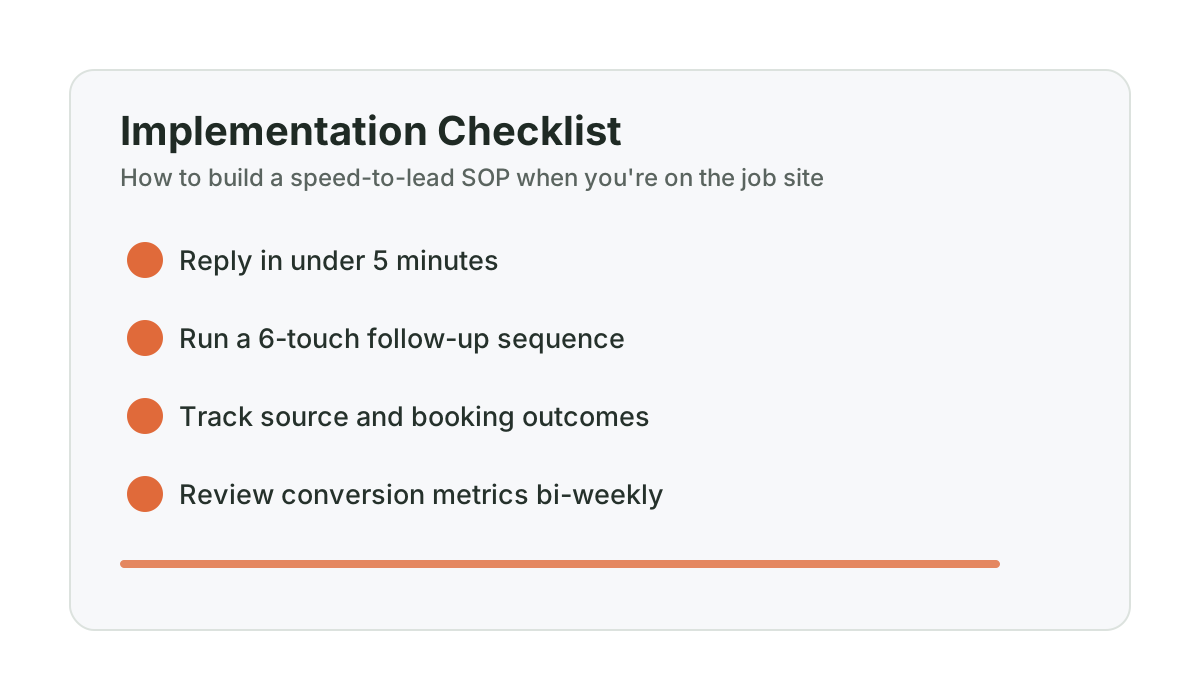
- A written contractor lead response SOP eliminates improvisation — contractors with formal processes achieve significantly higher contact rates than those relying on memory.
- Your SOP must cover four scenarios: available, on job site, in a meeting, and after hours. If it only covers “available,” it is not a real SOP.
- Define response owners, time targets, routing logic, and escalation rules for every lead channel.
- Six contact attempts more than double your contact rate compared to one or two attempts — most contractors stop too early.
- Test your SOP quarterly by calling your own number and submitting your own forms.
Why do contractors need a written lead response SOP?
A contractor lead response SOP is a written document that specifies exactly who responds to each new inquiry, through which channel, within what timeframe, and with what script — across every scenario from job site hours to evenings and weekends. It replaces improvisation with consistent execution.
Many contractors have a mental SOP. They know they should call back quickly, follow up on estimates, and check messages regularly. The mental version fails because it depends entirely on memory, bandwidth, and the absence of competing demands. On a job site, all three of those fail constantly.
A written SOP removes the decision-making from the moment of chaos. When a lead comes in, you’re not thinking about what to do — you’re executing a defined process. The difference between a contractor who loses 40% of leads and one who loses 15% is usually not effort or intention. It’s whether the process is written down and followed consistently.
The research supports this. InsideSales found that companies with formal lead response processes achieve significantly higher contact rates than those relying on individual follow-through. Source: InsideSales.com, “Lead Response Management Study,” 2011 Consistent process beats heroic individual effort every time.
What are the four scenarios your SOP must cover?
Before writing the SOP, map out when leads actually arrive and what your availability looks like. For renovation contractors, there are four distinct scenarios:
- You’re available — not on a job site, phone in hand, able to call back within minutes
- You’re on a job site — physically busy, phone nearby but can’t have a full conversation
- You’re in a meeting or customer-facing situation — phone off or silenced, unavailable for 30–60 minutes
- You’re after hours — evenings, weekends, holidays when you’re genuinely offline
Each scenario needs a defined response. A SOP that only covers Scenario 1 is not a SOP — it’s a note to yourself about what to do when you’re already available. The value is in the other three.
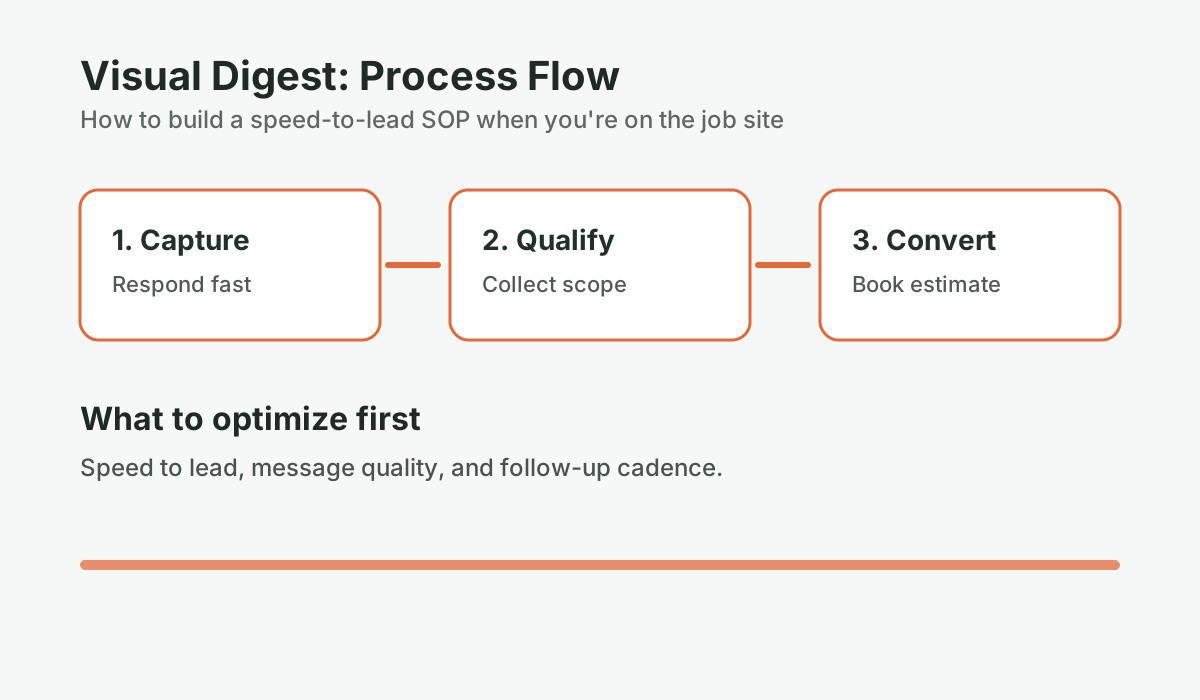
The SOP framework: step by step
Step 1: Define your lead channels and response owners
Start by listing every way a lead can contact you:
- Business phone call (answered or missed)
- Website contact form
- Google Business Profile message or call
- Text to your business number
- Facebook or Instagram message
- Referral call (someone gave them your number directly)
- Email inquiry
For each channel, assign a response owner. That owner is the person responsible for ensuring a response goes out within your target window. If you’re a solo operator, that’s you. If you have a spouse or admin handling the office, define which channels they cover.
The goal of this step is to eliminate the assumption that “someone will handle it.” Someone specific handles each channel, on a defined timeline.
Step 2: Set your response time target by scenario
Based on MIT research, under 5 minutes is the standard that produces dramatically better contact rates. Source: MIT Lead Response Management Study, 2007 But being honest about what’s achievable across all scenarios is important. Here’s a realistic target structure:
| Scenario | Initial Response Target | Channel | Responsible |
|---|---|---|---|
| Available (phone in hand) | Under 2 minutes | Call or text | You |
| On job site, phone accessible | Under 10 minutes | Text first, call at break | You or admin |
| In meeting or customer-facing | Under 30 minutes | Text (automated or admin) | Admin or automated |
| After hours (evenings/weekends) | Under 5 minutes (automated) or next-morning call | Automated text + morning call | Automated system |
The after-hours scenario is where most contractors have no coverage at all. Invoca data shows that 27% of calls to home service contractors go unanswered, and a large portion of those are evenings and weekends. Source: Invoca, “The State of the Conversation: Call Intelligence for Home Services,” 2022 If your SOP has no answer for after-hours leads, you’re silently losing a significant portion of your pipeline. For a dedicated approach to this gap, read the after-hours lead capture guide.
How fast are you actually responding to leads?
Take the Speed-to-Lead Leak Scorecard. Five questions, three minutes. See where you stand compared to contractors who close 35%+ of their estimates.
Run the numbers for your business: Take the Speed-to-Lead Scorecard. It takes 2-3 minutes and gives you a clear baseline before your next estimate round.
Step 3: Write the first-minute script
When you or your admin calls back a new lead, the first 60 seconds of that conversation determine whether you get the appointment. Most contractors wing this. Write it down instead.
Here is a first-minute script template you can adapt:
Call opening:
“Hi, is this [Name]? This is [Your Name] calling from [Company] — you reached out about a renovation. Is now a good time for a quick two-minute chat?”If yes — discovery questions:
“Great. What are you looking to do?” [Let them talk. Don’t interrupt.]“And roughly where’s the property?”
“Do you have a ballpark timeline in mind, or are you still figuring that out?”
Transition to next step:
“Based on what you’ve described, this sounds like something we’d be able to help with. The best next step is to get on site and take a look so I can give you an accurate number. I have some availability [this week / early next week] — are mornings or afternoons generally better for you?”
This script has a specific structure: it gets permission to continue, it asks about the project before asking about logistics, and it moves to booking before the homeowner can disengage. “Are mornings or afternoons better for you?” assumes the appointment will happen and makes the question about scheduling, not about whether they’re interested. That framing matters.
Step 4: Define your routing logic
Routing logic answers the question: “When this specific situation occurs, exactly who does what?” Write it out as a decision tree:
- Phone call, I answer: Use first-minute script. Book appointment. Log in CRM.
- Phone call, I miss, before 6 PM: Automated text-back within 60 seconds. Admin callback attempt within 10 minutes during business hours. Log missed call in CRM.
- Phone call, I miss, after 6 PM: Automated text-back within 60 seconds. My callback first thing the next morning, before 9 AM. Log in CRM.
- Website form submission: Auto-confirmation email sent right away. Text to lead within 5 minutes. Callback attempt within 30 minutes during business hours.
- Text inquiry: Text response within 5 minutes. If complex, schedule a call.
- Email inquiry: Response within 2 hours during business hours, with calendar link to book time.
Make this specific enough that someone unfamiliar with your business could read it and know exactly what to do. If there’s ambiguity, they’ll revert to whatever feels right in the moment — which means inconsistency.
Step 5: Define escalation rules
An escalation rule answers: “When does this lead get bumped up as a priority?” For renovation contractors, here are the situations that warrant escalation — meaning someone drops what they’re doing and handles this:
- Any lead that mentions a specific project value over $50,000
- Any lead that mentions a tight timeline (“we want to start in four weeks”)
- Any referral from an existing client
- Any lead that has reached out twice without a response
- Any lead that has scheduled an estimate but not been confirmed the day before
Write these down. Escalation rules fail when they’re understood rather than documented, because “understood” rules don’t get applied consistently under pressure.
Step 6: Define what happens if no response after the first two contacts
This is where most SOPs stop — and where most revenue leaks. After your first call and text go unanswered, what happens next? Define the full follow-up sequence:
- Day 1: Initial text (Text 1) + callback attempt within the hour
- Day 1 (2 hours after Text 1): Text 2 if no response (see the two-text playbook)
- Day 2: Second callback attempt, voicemail if no answer
- Day 4: Final active outreach — text or call
- Week 2: Move to nurture sequence — lighter touch, every 7–10 days for 4–6 weeks
Research from InsideSales shows that making six contact attempts more than doubles contact rate compared to one or two attempts. Source: InsideSales.com, “Lead Response Management Study,” 2011 Most contractors stop at two. That’s where the gap is. If you already have sent an estimate and are waiting on a response, the problem shifts — see why renovation sales die after you send the quote for the follow-up approach specific to that stage.
How to handle leads when you’re on a ladder
This is the hardest part of any SOP to implement because the answer requires honesty about what you can actually do while you’re doing the actual work.
For contractors without admin support or automation yet, this is a practical approach:
1. Use your voicemail as a SOP tool. Record a message that prompts callers to text you with their name and project. “I’m on a job site right now. Text me your name and what you’re looking to do and I’ll get back to you within the hour.” This buys you time and filters for homeowners who are serious enough to text.
2. Set a post-task alarm. Every time you finish a discrete task on the job site — finish a measurement, complete a section, take a break — check missed calls and respond. This doesn’t need to be every 5 minutes. It needs to be consistent and within the hour.
3. Assign evenings as dedicated response time. If you can’t respond during job site hours, block 5–6 PM as “lead response time” before you wrap up for the day. Check all missed calls, all form submissions, all texts from that day. Call back or text every one. This won’t beat a 5-minute response time, but it beats a 24-hour response time significantly.
4. Consider automation for the after-hours piece first. You can’t add hours to your day. But automated text-back for missed calls during job site hours and after-hours coverage is a realistic alternative. The ConversionSurgery Revenue Recovery System runs this for contractors automatically — it monitors inquiries around the clock, responds within seconds during legally permitted messaging hours, queues restricted-hour inquiries for the next compliant window, and routes qualified conversations to the contractor when escalation is needed. In modeled scenarios based on published benchmarks, structured lead capture can improve conversion by recovering leads that previously fell through after hours.
How to test your contractor lead response SOP
Before deploying a SOP, test it. Have someone call your business number and submit your contact form. Measure the actual response time. Check whether the routing logic worked. Check whether the text-back came through. Check whether the voicemail prompted the right action.
Most contractors who do this are surprised by what they find. Common failures: form submissions going to an unmonitored inbox, voicemail that doesn’t invite a text response, callback attempts that happen without a documented note in any system.
Run the test quarterly. SOPs break when businesses evolve and the written document doesn’t. If you want to see the financial impact of getting this right, the ROI of faster lead response puts real dollar figures on the difference between a 42-minute response and a 5-minute one.
For tracking whether your SOP is actually working, read the one KPI that predicts booked estimates. And if you want to put the whole thing to a structured test, the next post in this series — the 7-day speed-to-lead challenge — gives you a day-by-day framework for auditing your actual performance.
Frequently asked questions
What should a contractor SOP for lead response include?
A complete lead response SOP for a renovation contractor should define: all channels a lead can arrive through, the response time target for each scenario (available, on job site, in meeting, after hours), who is responsible for the first response in each case, the exact script or template used for first contact, the routing logic for different lead types, escalation rules for priority leads, and the full follow-up sequence if initial contact attempts get no response. Without all of these components, the SOP will fail in predictable ways.
How do I handle new leads when I’m physically on a job site?
The most practical approach for solo operators is a combination of three things: a voicemail message that prompts callers to text you (buying time while keeping them engaged), a post-task habit of checking missed calls every 30–60 minutes during natural job site breaks, and — if lead volume justifies it — automated text-back that sends a fast acknowledgment while you’re unavailable. The goal is to ensure that no lead goes more than an hour without some form of acknowledgment, even if a full callback conversation has to wait until a break.
What is a first-minute script for contacting a renovation lead?
A first-minute script should: get permission to continue the conversation, ask about the project before asking about logistics, identify key qualifying information (project type, location, timeline), and transition to booking an estimate appointment. The transition should use language that assumes the appointment will happen — “are mornings or afternoons better for you?” rather than “would you like to schedule a visit?” The former makes the decision about timing, the latter makes it about whether to proceed at all.
How many contact attempts should I make before marking a lead as lost?
Research from InsideSales suggests six contact attempts before considering a lead unreachable through active outreach. For renovation contractors, a practical sequence is: two contact attempts in the first 48 hours (with texts), one follow-up per day on days two and four, then a weekly check-in for four to six weeks through a nurture sequence. After six to eight weeks of no response to any outreach, move the lead to a long-cycle dormant list. Some renovation leads will re-engage six to twelve months later when their project timeline becomes concrete.
Should I use CRM software to manage my lead response SOP?
A CRM makes SOP execution easier — it creates a record of every contact attempt, surfaces leads that haven’t been followed up, and gives you visibility into your pipeline. But you don’t need a CRM to start. A Google Sheet with columns for lead date, source, contact attempts, last contact date, and status will get you 80% of the value. The important thing is having a record — some kind of external system that doesn’t rely on your memory. Start simple and add tools only when the simple version becomes the bottleneck.
Want help applying this to your pipeline?
Use the matching diagnostic tool first, then book a quick strategy call if you want a done-for-you rollout.

Mashrur Rahman
Founder, ConversionSurgery
I build revenue recovery systems for renovation contractors. After seeing how much money remodelers lose to slow follow-up and missed calls, I built a managed service that handles lead response, estimate follow-up, and after-hours capture automatically. The data in these articles comes from running these systems across real contracting businesses.
Related reading
First-response scripts for Alberta renovation contractors: what to send in the first 60 seconds
A practical 60-second response script library for missed calls, web forms, and inbound SMS in Alberta renovation markets.
Calgary renovation lead response benchmarks (2026): basement, kitchen, and bathroom contractors
Local Calgary benchmarks for response speed, answer rate, and booked estimates so you can see exactly where your pipeline is leaking.
The 7-day speed-to-lead challenge for renovation contractors
Track your actual lead response time for 7 days and you’ll see exactly where you’re losing jobs. Most contractors are surprised by what they find. Here’s the framework.